Team
How a director splits work, who checks it, and where you watch it happen.
Delegation
A director agent does not do the hands-on work. For each unit it starts a sub-agent and gives it:
- a playbook, the kind of work (see below);
- a brief, which must stand on its own, because a sub-agent cannot see your chat;
- a Done means, what a verifier can observe: a command and its expected output, a flow in the running app, or a value read back.
Each director can have 4 active sub-agents at once (ORCH_SUBAGENTS_MAX). Past that, it is told to wait for
one to finish or to cancel one.
You can delegate by hand as well. On the Team tab, press Delegate a task and fill in Report the result to, Playbook, Title, Brief and Done means. Brief and Done means are required.
The four playbooks
| Playbook | What it does | Where |
|---|---|---|
feature | Builds one feature and proves it works on the real interface. | Own worktree and branch |
bugfix | Reproduces the bug first, finds the root cause with evidence, then fixes it and checks the same reproduction. | Own worktree and branch |
refactor | Records current behaviour first, then changes structure in small steps that keep that record the same. | Own worktree and branch |
investigate | Answers a question with evidence from the code and its history. Read-only. | The director's folder |
A worktree is a separate copy of your project on its own branch, named orch/<id>. If the
director's folder is not a git repository, a sub-agent has no worktree and shares that folder; its card says
no worktree.
Once a finished sub-agent's branch is merged into another local branch of the same repository, Donezo removes its
worktree and branch by itself (at startup, after each task ends, and every 10 minutes); its card then says
merged · cleaned up. A worktree with uncommitted files, or a branch that is not merged, is
left alone; files git ignores (such as .env) do not count as changes and are removed with it. A squash
merge is not recognised, so use Discard for those.
The verifier
When a sub-agent ends its turn, Donezo starts a brand-new agent, the verifier, to check the Done means. No agent grades its own work.
- It observes. It runs the command or drives the flow itself. The builder's report counts as a claim, not as proof.
- It may not edit. If files change while it runs, its verdict is thrown away.
- Each verdict is tied to a commit. A pass reads Verified at that commit.
- Fail goes back. The findings return to the same sub-agent to fix, then a new verifier checks again.
- A fail raises the effort. Each sub-agent starts at the effort the director picked (by default
mediumfor investigate,highotherwise). Each fail moves it one level up, toxhighat most. The verifier runs athigh, orxhighwhen it is re-run because the last one gave no verdict. If 2 of the last 5 tasks of a playbook needed a step-up, new ones start one level higher. The model never changes. Cards show both, for exampleSonnet 5.5 · effort: medium → high; messages to the director show the same line with the model id,claude-sonnet-5-5. - It stops at a limit. After 3 failed verifications (
ORCH_SUBTASK_MAX_ATTEMPTS) the work is marked failed, the director is told, and it shows up on Home.
Every pass or fail goes back to the director as a message. It does not need to keep asking.
The Team tab
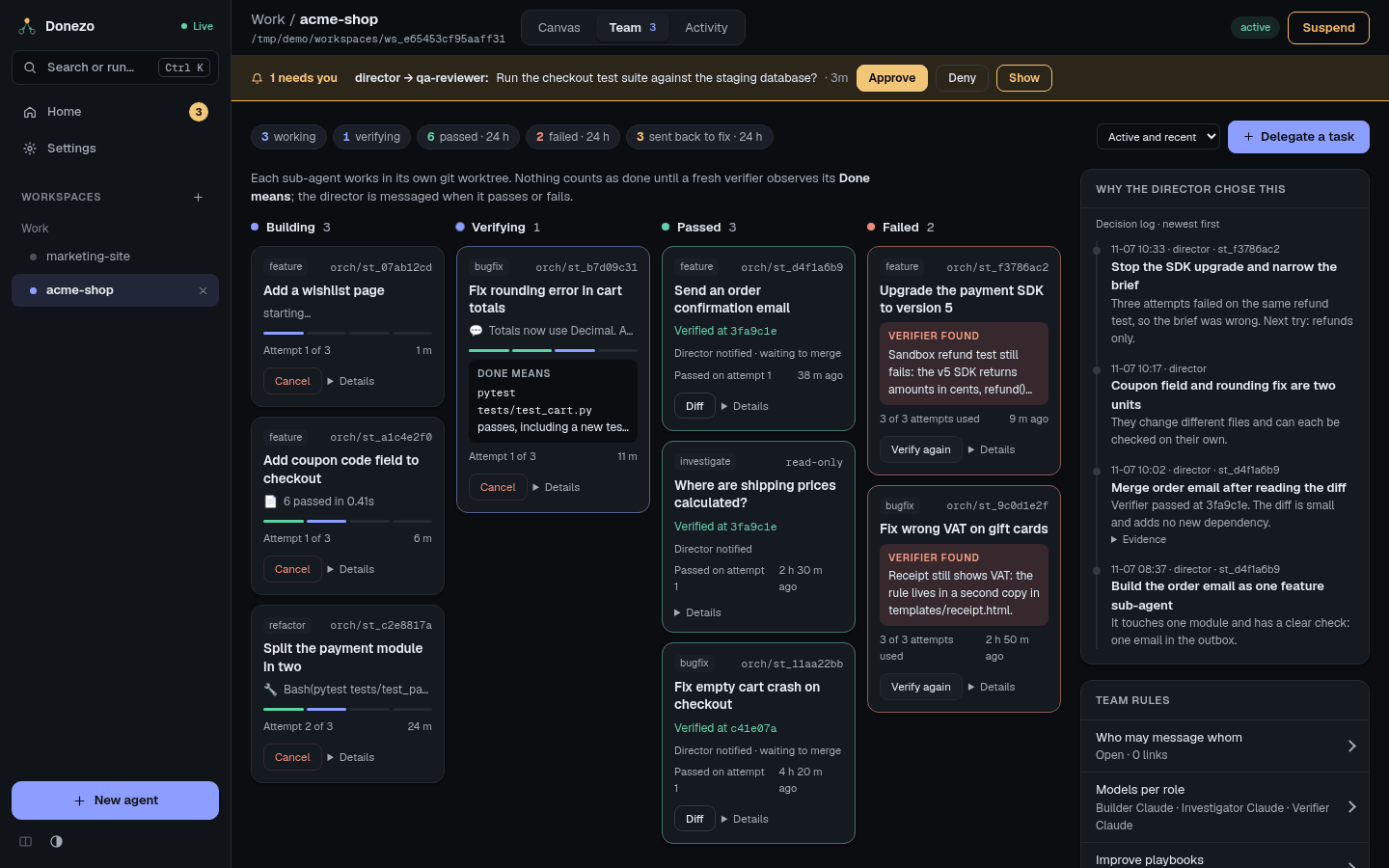
The row on top counts what is working and verifying now, plus what passed, failed, and was sent back to fix in the last 24 hours. The filter switches between Active and recent, All and Failed. With two or more directors, another filter appears (All directors). Scrolling loads more, 10 at a time.
| Column | Meaning |
|---|---|
| Building | Waiting to start, working, or fixing after a failed check. |
| Verifying | A verifier is checking. The card shows the Done means. |
| Passed | Verified. The card shows the commit and that the director was told. |
| Failed | Out of attempts or stopped, with what the verifier found. Cancelled work is listed here too, under the All filter. |
Buttons on a card depend on its stage:
- Cancel: stops work in progress. A running step is killed and the director is told.
- Diff: the branch's changes.
- Verify again: one more independent check, for example after you fixed something by hand.
- Details: the brief, the Done means, the verdict and the builder's report, plus Builder run, Verifier run and, when it applies, Copy merge (copies the merge command) and Discard (removes the worktree and deletes the branch; commits that were not merged are lost).
The director's own panel on the canvas shows the same cards for its team. Its button Whole team & settings leads here.
The Board tab
Every agent you made (not its sub-agents) has a board: the backlog of work it holds. Pick the agent at the top; it opens on the one with the most proposals waiting, otherwise the most open cards. Cards sit in four columns: To do, In progress, Done and Dropped (folded until you click Show).
A card in a column shows only its number and title, so the columns stay easy to scan. The number, such as
#12, is the one you and the agents use to name a card (card_id in the board tools).
Click a card, or focus it and press Enter, to open it: the window shows who added it, the full details, the source
link, the note and every action. Close, Escape or a click outside closes it. While it is open
it follows changes an agent makes to the card.
- Add card puts a title, and optional details, into To do. The agent can add cards too
(
board_add), for work you asked for that it will not start now. The open card says who added it. - In the open card, the list moves it to another column. The pencil edits the title and details, the bin deletes the card.
- When the director delegates a card, it shows the sub-agent's task id and status and moves by itself: to In progress when work starts, back to To do (with a note why) when it fails, is cancelled or its work is discarded, and to Done when it passes, or for code changes once the branch is merged. A card you moved to Done or Dropped stays there.
The board only holds work; sub-agents still do it. Cards stay when their agent is unregistered.
Proposals
A proposal is an idea the planner found while researching, with a link to where it found it. It waits in a Proposed column, first on the board, until you decide. Only you decide: no agent can approve or start a proposal on its own, not even the agent whose board it is on. An agent cannot reword a waiting proposal or bring back one you rejected; you still can.
- Approve moves the card to To do, where it is ordinary work again. Reject moves it to Dropped. Open the card to find both; either one first asks for an optional reason.
- The reason is kept on the card and shown in its note, for example approved: users keep asking. The agent
reads it with
board_list. - You can also tell your agent in chat, for example approve card 7, users keep asking or reject card 8,
out of scope. It decides with
board_decide, and the note then says so, for example approved via agent: users keep asking. The agent never decides by itself, only when you ask. - The link shows the site's name and opens in a new tab.
- The number on the Board tab counts the proposals waiting in that workspace. Home lists each workspace that has some under Needs you; Open Board takes you there.
Planner
Above the columns, each agent has a Planner. Switched on, it runs a scout every few days: a fresh Claude session that searches the web for trending projects, techniques and industry practice that fit the agent's product, and files at most three proposals on that agent's board. Zero is a normal result.
- Pick every how many days (1 to 90) and switch it on. The first run is scheduled that many days out. Scout now runs it at once. Any run moves the next one a full interval later.
- The agent writes the product brief (what the product is, who it is for, what matters now) with
planner_brief. With no brief yet, switching on or Scout now asks the agent to write it, and the run starts once it is saved. Ask the agent to write it asks again. You can edit the brief and click Save. - Parts of the brief are typed into public web searches, so keep secrets and private details out of it.
- What the scout gets: the brief, the titles of the board's open cards, the proposals it already made (so it does
not repeat them) and your past decisions on them with your reasons. Like every Claude session, it also loads
your personal
~/.claude/CLAUDE.mdif you have one: keep secrets out of it. - What it can do: search the web, read pages, and file proposals. It runs in an empty folder (removed when the run ends), not the agent's project; it has no shell and no file tools, none of your other MCP servers, and no signal tool except filing a proposal. It cannot read your files, message agents, or start work.
- Only you approve a proposal. Approved proposals become To do cards; the agent never approves its own.
The panel shows when the next run is due and how the last one went: when, its status, how many proposals it filed, the tokens it used, and why it failed if it did.
Decision log
Why the director chose this is a list, newest first, of the decisions the director and sub-agents recorded: what they chose, why, and sometimes Evidence you can expand. Decisions about one sub-agent show its task id. Read it when you want to know why the work was split a certain way, or why a failure was dropped.
Team rules
- Who may message whom: Open — edges are documentation lets any agent signal any other. Enforced — only these edges may signal allows only the sender and receiver pairs you listed. Add them with Add edge, or with Learn from recent signals. People and sub-agent results always get through.
- Sub-agents and verifiers: whatever model the director uses, a sub-agent runs Claude Sonnet 5.5 or Opus 5.5 and a verifier always runs Opus 5.5. The director picks the sub-agent's model; if it does not, low or medium effort gets Sonnet 5.5 and high or xhigh gets Opus 5.5. Each sub-agent shows its model next to its effort. The line also shows the learned start: the effort each playbook starts at right now.
Reflect
Reflect turns past failures into a better playbook. Nothing is written until you approve it.
- Open Improve playbooks under Team rules.
- Choose what to improve: a director's own role SKILL, or a playbook for this repository.
- Press Reflect. A read-only agent reads failed runs and verifier findings, then proposes a change. If nothing has gone wrong for that playbook yet, the app says so and nothing runs.
- Read the reasoning and the diff, then press Approve and write or Reject.
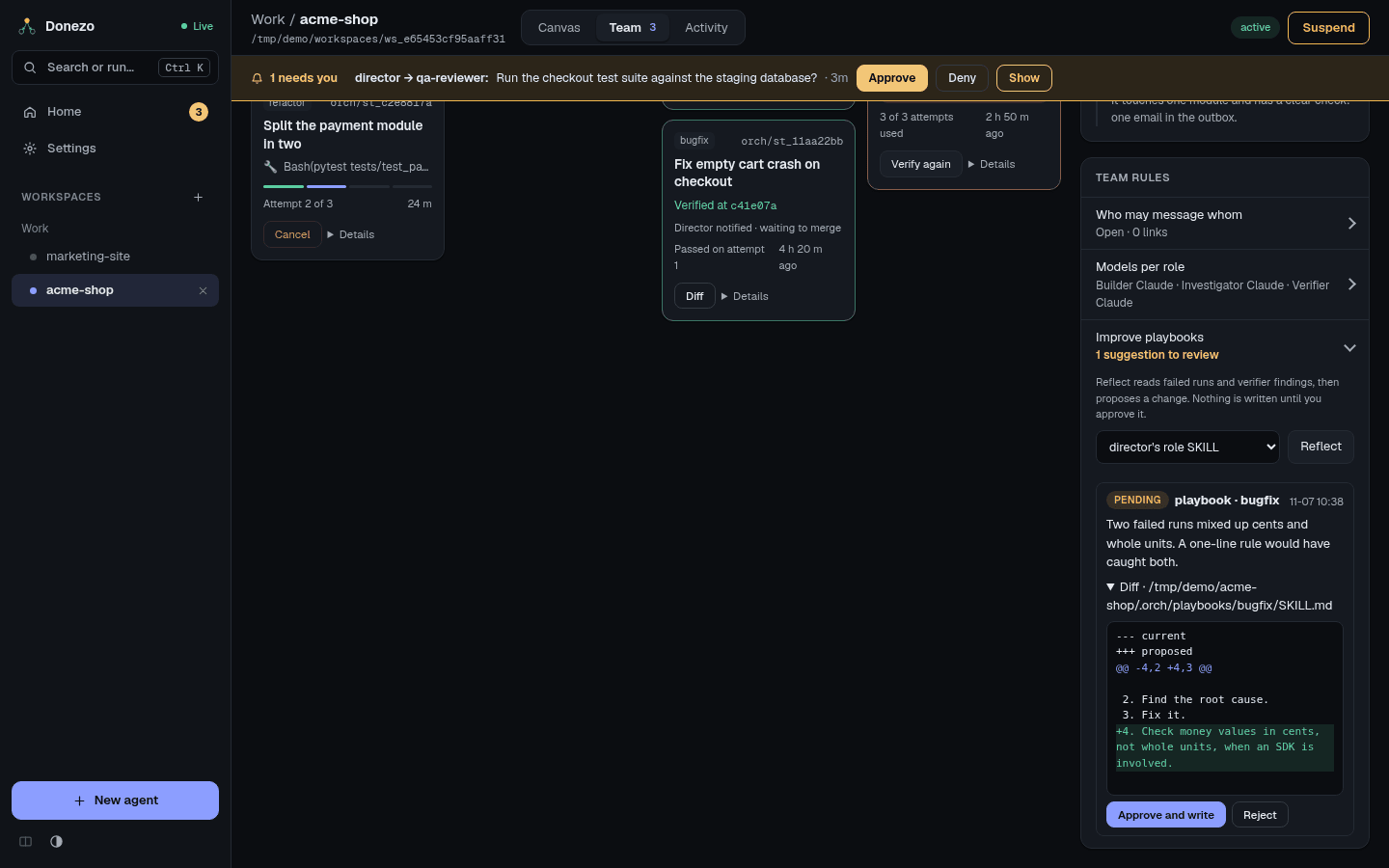
.orch/playbooks/.